notes on document processing with groff
groff is the GNU version of troff, an ancient UNIX typesetting program that does many of the things one would expect out of a “modern” markup language or typesetting system like Typst or LaTeX.
I wrote these notes for myself, because I am new to roff and I have a poor memory.
It has a couple of issues, like not natively supporting UTF-8, which Plan 9’s troff has supported for over 30 years. Image support is weird, too. Fortunately there are workarounds for both of these problems.
This document covers some of the basics of the “manuscript” macro package, a.k.a. ms.
actually running this damn thing
Typical PDF generation commands for tables, images, math, and UTF-8 —> PostScript —> PDF
groff -ms -teK utf8 -Tps source.ms > destination.ps … Compile to PostScript
gs -dNOPAUSE -sDEVICE=pdfwrite -sOUTPUTFILE={TARGET}.pdf -dBATCH ${TARGET}.ps … Convert to PDF
The -ms tag enables the “Manuscript” macro set.
The flags -t and -e invoke the tbl (tables) and eqn (equations) preprocessors respectively. -Tps tells groff to spit out PostScript code that you can redirect to a file with >.
The gs command is a clusterfuck and I will not explain it. All that matters is you get a PDF out of it. We use PostScript the whole way until converting to PDF at the end because PostScript is a LOT easier to work with, especially with images.
syntax
Create a title page for a report
To instead show this title and information on the beginning of the first page,
omit the line containing .RP
Numbered Header with Paragraphs
This is equivalent to:
Math
Math is handled by eqn and is invoked with .EQ ... .EN
It may not be as massively featureful as LaTeX, but it’s actually still quite cromulent.
Here’s some random notes I hastily jotted down, originally in LaTeX, rewritten for EQN for your reading pleasure. They’re from a circuits class that I did horribly in, so there’s probably a lot of mistakes.

As you can see, arrows are a thing too. I don’t know about you but -> is an awful lot nicer to type than \rightarrow. Greek letters work too:
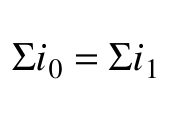
Okay, here’s an easy one:
Now that ain’t pretty, but consider that I originally wrote it like this:
\omega = \int_{-\infty}^{t} p(\tau)d\tau = \int_{-\infty}^{t} Cv {dv \over d\tau}d\tau = C \int_{v(-\infty)}^{v(t)} vdv = \left.{1 \over 2}Cv^{2} \right \vert_{v(-\infty)}^v(t)
…and that’s why I started learning groff.
Well anyway, this is what they look like rendered. LaTeX on the top, EQN on the bottom.
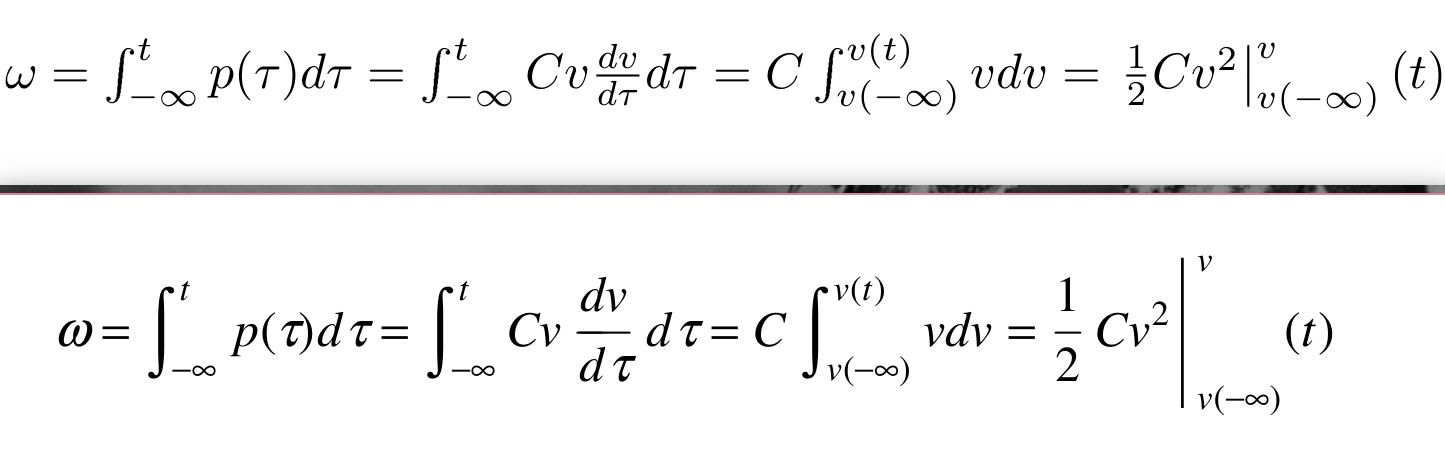
Notice that the LaTeX output is a bit fancier looking, but the code behind it isn’t exactly readable.
Other stuff
Indentation
.IP– Indented paragraph.QP– Quoted (indent) Paragraph.QS,.QE– Open/Close Quoted Section
Resizing Text
Headings are the same size of the rest of the document. Personally, I don’t really jive with that. One workaround is to manually set the size of each heading.
Insert Images; Insert Pictures
.PSPIC -[L|C|R] "TARGET.eps" – include TARGET.eps as an image, aligned Left, Center, or Right.
Images need to be Encapsulated PostScript (well, they don’t NEED to be, but it’s the path of least resistance.
Convert your images to EPS like this:
magick source.png destination.eps
You can check to see if it worked using something like zathura.
Unordered (bulleted) lists
Replace \[bu] with - for dashes instead of bullets. Or whatever you want really.
Ordered lists
No.
See also
- eqn: Formatting Equations in groff
- Groff Cheatsheet
- Typing Documents on the UNIX System: Using the -ms Macros with Troff and Nroff